
Rockville TM80 & TM150
Powered Home Theater Tower Speakers w/ Subs and Wireless Streaming
Includes
- Main Speaker (Active)
- Secondary Speaker (Passive)
- Speaker Interconnect Cable (GX16 4-Pin Female to Female)
- Antenna Wire
- Remote Control
- Plastic/Rubber feet
- 1-Year Manufacturer's Warranty
Important Safety Instructions
To reduce the risk of electrical shock, do not remove amplifier plate. No user serviceable parts inside. Refer service to the Rockville service department.
- Do not place these speakers on an unstable surface. The speaker may fall over, causing serious injury to a child or adult and serious damage to the unit.
- Do not use these speakers near water; for example, near a bathtub, sink, in a wet basement, or near a swimming pool.
- The speakers should be situated away from heat sources such as radiators, heat registers, stoves, or other devices that produce heat.
- These speakers should be connected to a power supply outlet of the same voltage as that which is specified on the amp plate of the unit. Protect the power cord from being walked on or pinched, particularly at plugs, convenience receptacles, and the point where it exits from the unit.
- Clean only with a soft damp cloth. Unplug this product from the wall outlet before cleaning.
How to Avoid Irritating Feedback
When using a mic with your speakers... The placement of your microphone is critical in avoiding feedback through your speaker. Never set up your microphone in front of the speaker. Always set up your microphone behind the speaker. When approaching the speaker to make any adjustments, we recommend approaching the speaker from the rear and not walking directly towards the front of the speaker.
Front Panel – Main Speaker
- Volume +
- Previous Track / Previous Channel
- Next Track / Next Channel
- Standby
- Input Select
- Play-Pause / Automatic Station Search (FM radio)
- Volume –
- SD Card Input
- USB Input
- Mic 1 Input
- Mic 2 Input
Rear Panel – Main Speaker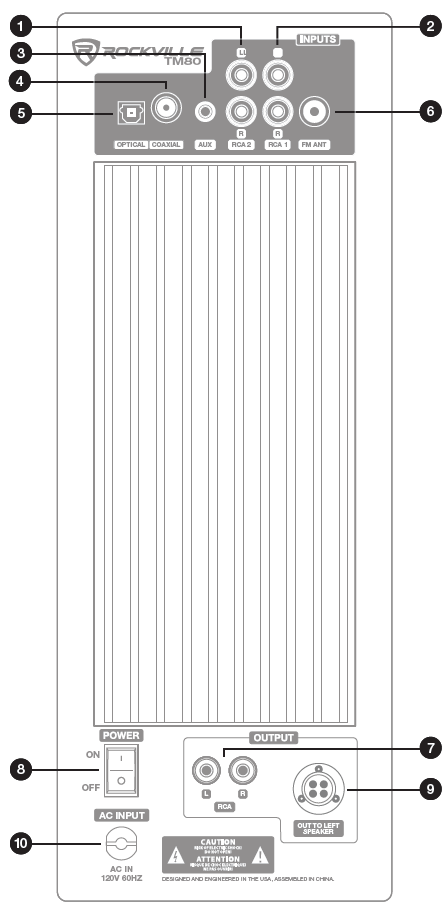
- L/R RCA Input 2
- L/R RCA Input 1
- 3.5mm AUX Input
- Coaxial Input
- Optical Input
- FM Antenna
- L/R RCA Output
- Power Switch
- Output to Secondary Speaker
- Power Input
Remote Control
⚠️When the Power Switch (Rear Panel; item 8) is off, the speakers will not respond to the remote.
Standby: Turns all function off/on.
MUTE: Cancel unit sound
OPT/COAX: Select optical or coaxial input
SD/USB: Select SD or USB input
BT: Enter wireless streaming mode
FM: Enter FM radio mode
AUX1/2/PC: Select RCA1, RCA2, or AUX input
CH +/-: Use to navigate FM stations
⏮ / ⏭: Previous track / Next track
⏯: Play/Pause in USB/SD/BT modes
AUTO: Automatic station search
SAVE: Save stations to unit memory
TUNE +/-: Manually tune FM stations
SW +/-: Subwoofer volume level
TRE +/-: Adjust treble level
VOL +/-: Master volume control
EQ +/-: Select from preset EQ settings
DISP +/-: Adjust display brightness
#0–9: Number pad used to direct select tracks when in USB/SD mode
REPEAT: Repeat one song/repeat all songs/shuffle
MIC +/-: Adjust microphone volume
ECHO +/-: Adjust reverb volume
RESET
Speaker Setup
Place speakers in desired position. Using the included proprietary noise rejecting cable, connect the master speaker to slave unit. Now plug the master unit into the nearest AC outlet.
Wireless Bluetooth Streaming
To connect your iPod, iPhone, MP3 player, Android phone, or any other with Bluetooth streaming capability, follow the steps listed below.
- Make sure the unit is plugged in and the power switch is in the ON position.
- Press the BT button on the remote control or push the INPUT button on the unit until the digital readout shows "BT" and the blue indicator LED is on.
- Turn on the wireless streaming feature on your device and ensure that it is in "discoverable" mode. Search for Rockville TM80 or Rockville TM150 on your list of available devices and select it.
- Listen for the voice prompt, "Bluetooth link" which indicates the devices are successfully paired.
USB/SD
Please note:
Accepted file formats are MP3, WMA, WAV, FLAC, APE, F1A, SBC and AAC. Files must be properly formatted; simply changing the file extension to one of the specified formats will not work.
Using a drive with a capacity of 32Gb or less is recommended to ensure compatibility.
The USB drive will charge an iPod, but does not offer playback functionality.
For USB/SD playback follow the steps listed below.
- Make sure the unit is plugged in and the power switch is in the ON position.
- Press the USB/SD button on the remote control or push the INPUT button on the unit until the digital readout shows "USB" or "SD".
- Plug in your SD card or USB flash drive. The unit will automatically read the files and begin playing music.
RCA
These inputs, labeled RCA 1 and RCA 2, can be used to connect stereo signal sources such as TVs, Digital set-top boxes, game consoles, DVD players, CD players, etc. via stereo RCA audio cables.
For playback via RCA inputs follow the steps listed below.
- Make sure the unit is plugged in and the power switch is in the ON position.
- Press the AUX1/2/PC button on the remote control or push the INPUT button on the unit until the digital readout shows "AU1" or "AU2".
- If multiple sources are connected, use the remote button or INPUT button to switch between the sources.
Auxiliary
Use a 3.5mm aux cable to connect computers, tablets, certain TV models, or any other external sound source with a 3.5mm output.
- Make sure the unit is plugged in and the power switch is in the ON position.
- Press the AUX1/2/PC button on the remote control or push the INPUT button on the unit until the digital readout shows "PC".
Optical/Coaxial
Connect a standard Toslink Optical Cable to the Optical input, or a SPDIF Coaxial Cable to the Coax input for digital audio connection.
Many TVs, Digital set-top boxes, game consoles, DVD players and wireless (WiFi-based) media streaming devices have optical (fiber optics) or coaxial outputs. To connect via Optical or Coaxial input, follow the steps listed below.
- Make sure the unit is plugged in and the power switch is in the ON position.
- Press the OPT/COAX button on the remote control or push the INPUT button on the unit until the digital readout shows "OPT" or "COAX".
- Use a digital optical audio cable to connect the speakers to the source.
- Set your TV’s sound output to external speakers.
Please note: If you are having issues with sound output, go into your TV’s audio settings and make sure to deactivate Dolby Pro-Logic, Dolby ATMOS, etc. and select PCM format from the digital / optical audio format options.
FM Radio
For FM radio follow the steps listed below.
- Make sure the unit is plugged in and the power switch is in the ON position. Be sure to connect the included FM antenna.
- Press the FM button on the remote control or push the INPUT button on the unit until the digital readout shows numbers (see image below).
- While in FM mode, press the AUTO button to activate automatic station search. Use the CH+/- buttons to manually search through stations.
Mic Input
To use the system for karaoke, connect any microphone via either one of the 1/4" inputs located on the front of the unit.
RCA Output
Use these RCA outputs to connect an additional subwoofer or a second set of speakers.
Features
TM80
- (2) 8" subwoofers
- (4) Full-range drivers: 4" full-range drivers with polypropylene cones, rubber surrounds, and bullet dust cap
- (2) silk dome tweeters
- Class "A/B" amplifier circuitry with auto-switching power supply
- Built-in, 8 band equalizer with preset equalizer settings
- Adjustable bass and treble
- Computer optimized electronic crossover network supplies amazing sounding highs, lows, and mids
- Digital display on front panel with brightness control
- Built-in wireless streaming with 150-foot range and perfect interference-free sound quality
- Built-in USB playback (MP3, WMA, WAV, FLAC, APE, F1A, SBC, and AAC)
- Built-in SD card playback (MP3, WMA, WAV, FLAC, APE, F1A, SBC, and AAC)
- Built-in FM radio with crystal clear reception
- Full function remote included
- Front panel USB/SD inputs
- Easily connect to your television through RCA or through the optical connection
- Ferrofluid enhanced 1" neodymium silk dome tweeter
- Tweeter has 1" voice coil diameter
- Specially wound voice coils produce accurate response along entire frequency spectrum
- One complete pair with master/slave output connection
- Includes a noise rejecting cable to connect the 2 speakers together
TM150
- (2) 10" subwoofers
- (6) Full-range drivers: 4" full-range drivers with polypropylene cones, rubber surrounds, and bullet dust cap
- (2) silk dome tweeters
- Class "A/B" amplifier circuitry with auto-switching power supply
- Built-in, 8 band equalizer with preset equalizer settings
- Adjustable bass and treble
- Computer optimized electronic crossover network supplies amazing sounding highs, lows, and mids
- Digital display on front panel with brightness control
- Built-in wireless streaming with 150-foot range and perfect interference-free sound quality
- Built-in USB playback (MP3, WMA, WAV, FLAC, APE, F1A, SBC, and AAC)
- Built-in SD card playback (MP3, WMA, WAV, FLAC, APE, F1A, SBC, and AAC)
- Built-in FM radio with crystal clear reception
- Full function remote included
- Front panel USB/SD inputs
- Easily connect to your television through RCA or through the optical connection
- Ferro fluid enhanced 1" neodymium silk dome tweeter
- Tweeter has 1" voice coil diameter
- Specially wound voice coils produce accurate response along entire frequency spectrum
- One complete pair with master/slave output connection
- Includes a noise rejecting cable to connect the 2 speakers together
Specifications
TM80
- Peak Power: 800 watts
- RMS Power: 200 watts
- Amplifier: Class A/B
- Quad Amp Design: each driver features frequency specific independent amplifiers
- Low Frequency: (2) 8" paper cone with sponge surround
- Mid Frequency: (4) 4" polypropylene cone with rubber surround
- High Frequency: (2) 1" neodymium silk dome tweeter
- Frequency Response: 40Hz - 20kHz
- SPL Peak: 106dB @1w/1m
- S/N Ratio: >60dB
- Separation: >45dB
- Input Connectors: (2) unbalanced RCA, (2) balanced front panel 1/4", (1) Optical, (1) 3.5mm, (1) USB 2.0, (1) SD
- Output Connectors: (1) unbalanced RCA
- AC Power Input: 120V (60Hz)
- Dimensions (H x W x D): 31.9" (810mm) x 6.3" (160.02mm) x 12.99" (330mm)
- Weight (both speakers): 41.9lbs (19kg)
TM150
- Peak Power: 1000 watts
- RMS Power: 250 watts
- Amplifier: Class A/B
- Quad Amp Design: each driver features frequency specific independent amplifiers
- Low Frequency: (2) 10" paper cone with sponge surround
- Mid Frequency: (6) 4" polypropylene cone with rubber surround
- High Frequency: (2) 1" neodymium silk dome tweeter
- Frequency Response: 40Hz - 20kHz
- SPL Peak: 110dB @1w/1m
- S/N Ratio: >60dB
- Separation: >45dB
- Input Connectors: (2) unbalanced RCA, (2) balanced front panel 1/4", (1) Optical, (1) 3.5mm, (1) USB 2.0, (1) SD
- Output Connectors: (1) unbalanced RCA
- AC Power Input: 120V (60Hz)
- Dimensions (H x W x D): 37.4" (950mm) x 6.3" (160.02mm) x 12.99" (330mm)
- Weight (both speakers): 57.4lbs (26kg)
Troubleshooting
Problem | Solution |
No power |
|
No sound/distorted sound |
|
Mic feedback |
|
Poor mic sound |
|
Wireless streaming pairing fails |
|
No SD or USB playback |
|
Comments
0 comments
Please sign in to leave a comment.