
Rockville RPA70WBT V2
1000W Stereo Bluetooth Karaoke Receiver / Amplifier with Dual Wireless Mics
Includes
- Receiver/Amplifier
- (2) VHF Wireless Microphones
- Remote Control
- Rack Ears (Detachable)
- 1-Year Manufacturer's Warranty
Important Safety Instructions
To reduce risk of electric shock, never open the unit. There are no serviceable parts; refer service to the Rockville service center.
Do not expose this unit to any kind of moisture.
Do not place this unit near heat sources or expose to direct sunlight.
Do not place anything on top of unit. Doing so will block vents and cause the unit to overheat.
Please ensure that the unit is situated in a properly ventilated area.
Functions
Front Panel
Power Button
USB Input: For USB Flash / Thumb Drive
Stereo 3.5mm iPod/MP3 Input
Stereo 1/4" Headphone Output
Microphone 1 Input: 1/4" TS (Tip Sleeve) input for wired microphone or wireless mic receiver.
Microphone 2 Input: 1/4" TS (Tip Sleeve) input for wired microphone or wireless mic receiver.
Functions 1:
USB/BT/FM: Toggles between USB, Bluetooth, and FM input.
Play/Pause, FM Auto Scan: In USB mode, use the button to play or pause the current track. In Tuner mode, use to scan between stations. Press and hold for several seconds to store a station. This unit can store up to 50 stations.
Previous & Next: In USB mode, use these buttons to go to the previous or next track. In Tuner mode, use these buttons to go to the previous or next station.
Vacuum Fluorescent Display
Functions 2:
DVD/IPOD: Toggles between DVD and iPod input.
COAX/OPT: Toggles between Coaxial and Optical input.
Menu: Press this button repeatedly to toggle between options in the settings menu (Bass, Treble, Balance). Use the Master Volume knob to make adjustments to the desired setting.
LED: Dims LED illumination.
Microphone Volume: Controls volume level for included wireless microphones, as well as any microphone(s) connected to the 1/4" Mic Inputs (#5 & #6 above).
Microphone Tone: Simple control to make the mic less tinny, or to sound brighter and clearer.
Microphone Echo: Add Reverb / Delay effect to the microphones for singing.
Master Volume: Controls overall output volume. If you are in the settings menu mode, this knob can be used to adjust Bass, Treble and Balance. In FM mode, it can be used to navigate preset stations.
Subwoofer Output Volume Control: Controls Sub Out (Rear Panel; #6) volume level.
Rear Panel
Coaxial Input
- Optical Input
Telescoping Wireless Microphone Antenna: Expand to extend wireless mic range.
DVD/CD Music Stereo RCA Line Input: Connect computers, CD players, MP3 / media players or any other external sound source with line-level output.
Record Stereo RCA Line Output: Music output only; no mic sound.
Pre Stereo RCA Line Output: Mixed output including music and microphones.
Sub Stereo RCA Line Output: Low-Pass Line Output for powered subwoofer.
Left/Right Speaker Output A: Connect raw wire to binding posts or use single banana plugs* to connect speakers.
Left/Right Speaker Output B: Connect raw wire to binding posts or use single banana plugs* to connect speakers.
Cooling Fan
250V/6A Fuse: User Serviceable 250-Volt 6-Amp Fuse
AC Input: AC Power Cord (110V/60Hz – 220V/50Hz)
Voltage Selector Switch: 110V/60Hz(US power standard) – 220V/50Hz(UK power standard)
Telescoping FM Antenna: Expand to enhance FM radio reception.
* Not optimized for dual banana plug spacing.
Setup
The REC OUT output should only be used when connecting another device to record your mix. It will not work as a regular line level signal output as record level outputs are lower power signals than line level outputs.
⚠️ If connecting one speaker per channel, minimum impedance must be no less than 4Ω. If connecting two speakers per channel, minimum impedance must be no less than 8Ω. Using four speakers at 4Ω will eventually cause unit failure.
Two 4Ω or Two 8Ω Speakers:
Four 8Ω Speakers:
⚠️ Using 4 speakers at 4 ohms will eventually cause unit failure. When powering 4 speakers, the impedance of each speaker can be no lower than 8 ohms.
Remote Control
Input Button: Switch between input sources.
Power Button
Numeric Key Pad: In USB mode use to manually select tracks. In radio mode use to manually select stored stations.
Tuning Buttons: Use to fine tune FM stations.
Scan Button: Press to automatically search and store available FM station.
Mute
Left-Right Audio Balance
Treble Control (TREB)
Play/Pause Button: Play and pause music from USB input.
USB/BT: Press to directly select USB or Bluetooth mode.
Repeat Button: Repeats current track from USB input.
DSP: Press to cycle through the preset EQs: Live, Hall, Matrix, Disco, Theater, Church, Pops, Classic, and Off.
Display: Activates spectrum display mode.
Tuner: Press to directly select FM radio mode.
Memory Button: Allows user to save selected stations.
Stereo/Mono Button (ST/MO): Toggles between Stereo and Mono modes.
Master Volume Buttons: Press to increase or decrease volume level.
Bass Control (BASS)
Previous/Next Buttons: In USB mode only, move back or forward through tracks.
Reset: Reset unit to factory settings.
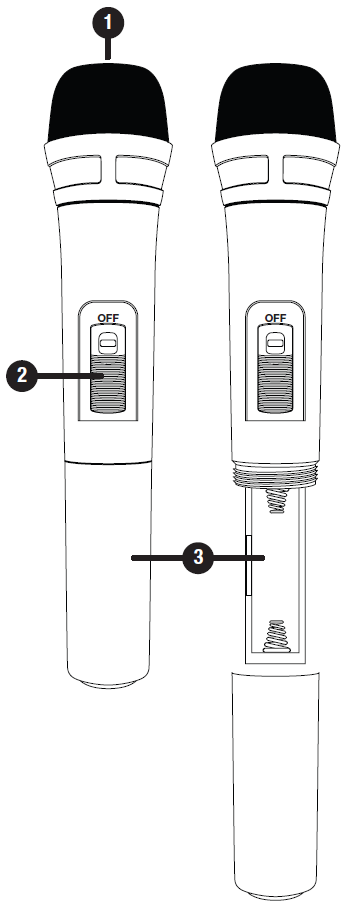 Wireless Microphones
Mic Function
Insert two AA batteries (not included) into the battery compartment (Mic Sections: #3 below) of each mic. Be sure to observe proper polarity.
Turn the mics on using the ON/OFF Switch (Mic Sections: #2 below) and they should automatically connect to the unit.
Extend the antenna (Rear Panel: #6) on the back for best reception.
To adjust the mic's volume, use the corresponding Mic Volume knob.
Additionally you can use the Mic Tone knob to increase voice presence and Mic Echo knob to add and adjust the echo effect.
Mic Sections ⇨ ⇨ ⇨
Windscreen
ON/OFF Switch
Battery Compartment
Bluetooth Function
Press the INPUT button located on the front panel to select Bluetooth mode. You will hear a tone and see the word "blue" on the screen.
Turn on the Bluetooth feature on your device and ensure that it is in "discoverable" mode. Search for "RPA60BT V2" on your list of available devices and select it. If pairing is successful you will hear a tone. You can control all features (play/pause, next, previous, volume) via the unit or the included remote control.
After initial pairing, the RPA60BT V2 will pair with your device automatically.
To un-pair simply disconnect the RPA60BT V2 via your device. If un-pairing is successful, you will hear a tone.
USB Function
Connect a USB drive to the USB port on the front panel. The unit will automatically begin playing music.
You can control all features (play/pause, next/previous, volume) via the unit or the included remote control.
Please note:
Accepted file formats are MP3 and WAV. Files must be properly formatted; simply changing the file extension to one of the specified formats will not work.
The maximum capacity of the drive must not exceed 64Gb.
The USB drive will charge an iPod, but does not offer playback functionality.
Fuse Replacement
The RPA70WBT V2 features a user-serviceable fuse compartment. Follow the steps below to replace a blown fuse. Make sure to replace the current fuse with another 6-Amp / 250-Volt 5x20mm Fast Blow Fuse.
Use a small screwdriver to turn the cap 1/2 turn and release the fuse holder.
Carefully slide the fuse holder out.
Remove the fuse from the holder.
Insert the new fuse into the holder.
Carefully slide the fuse holder in.
Use a small screwdriver to turn the cap 1/2 turn and lock the fuse holder in place.
Features / Specifications
RMS Power @ 4 Ohms: 125w x 2
Peak Power @ 4 Ohms: 500w x 2
RMS Power @ 8 Ohms: 100w x 2
Peak Power @ 8 Ohms: 400w x 2
THD: > 0.1%
Input Sensitivity: 400mv/33k Ohm
Frequency Response: 20Hz - 20kHz
Signal to Noise Ratio: 80 dB
Tone Characteristic: 100Hz - 10kHz ±12dB
110v/220v Switchable
Two VHF Wireless Microphones
Front Inputs: 3.5mm aux input, (2) 1/4" Mic Inputs, USB Input
Front Output: 1/4" Headphone Jack
Rear Inputs: RCA, Optical, Coaxial
Rear Outputs:
Preamp output for an external additional amplifier or powered speaker
Sub preamp output to connect a powered subwoofer or an amplifier
Record output to mixer or a recording device
Bluetooth Capable
Rear Speaker Terminals: Banana plug/binding post outputs
Pre-Amplifier output
Bass, treble, and balance control knobs
Multicolor VFD Display
FM Radio Tuner with Presets & Auto-Scan
Preset EQ: Rock, Pop, Classical, Jazz
Remote control for quick access to all functions
Vacuum Fluorescent Digital Output Display Meters
Separate gain controls for master volume & subwoofer
Digital Karaoke System
2 front microphone inputs with volume, tone and echo controls
Built-in Mic Mixer with Echo Control
USB input for music files from USB thumb drive
3.5mm input for iPod/MP3 player
Spectrum analyzer equalizer display
Turbo cooling twin fan system
Dimensions with rack ears (W x D x H): 19" x 12.25" x 3.5"
Dimensions without rack ears (W x D x H): 17" x 12.25" x 3.5"
Troubleshooting
Problem | Solution |
No power
|
|
No sound
|
|
Bluetooth pairing fails
|
|
Mic feedback
|
|
Buzzing sound |
|
Mic feedback or poor sound |
|
No USB playback
|
|
Comments
0 comments
Please sign in to leave a comment.